
Real Estate Carousel Posts: Showcase Properties That Sell
Real estate agents who use Instagram carousels for property listings get significantly more engagement than those posting single photos. The reason is straightforward: carousels let you tell a property’s story instead of just showing a front elevation.
According to the National Association of Realtors, 97% of homebuyers use the internet in their home search, and 51% found the home they purchased online. Social media has become a core part of the discovery funnel, and carousels — with their 0.55% average engagement rate, roughly double that of static images — are the format best suited to real estate’s visual, information-rich content.
But most real estate carousels are just photo dumps: exterior, kitchen, bathroom, bedroom, repeat. No structure, no story, no reason to engage beyond the pictures. That’s a missed opportunity. Here are six carousel formats that turn scrollers into scheduled showings.
Why Carousels Work for Real Estate
Properties are multi-dimensional. A single image can show one room. A carousel can walk a buyer through an entire property, room by room, exactly as they’d experience it during a showing.
Buyers need context. Price, square footage, neighborhood data, school ratings, commute times — buyers want information alongside photos. Carousels let you layer data on top of visuals.
Saves signal genuine interest. When someone saves your property carousel, that’s a stronger buying signal than a like. They’re bookmarking it to revisit, share with a partner, or compare against other listings.
Education builds trust. Market updates, buying tips, and neighborhood guides position you as an advisor, not just a salesperson. Carousels are the best format for educational real estate content because they let you break complex topics (mortgage rates, bidding strategies, inspection checklists) into digestible slides.
6 Carousel Ideas for Real Estate Agents
1. The Property Walkthrough (Storytelling Framework)
Format: 7-10 slides, one room or feature per slide Best for: Active listings where you want to generate showing requests
Structure the carousel like a guided tour:
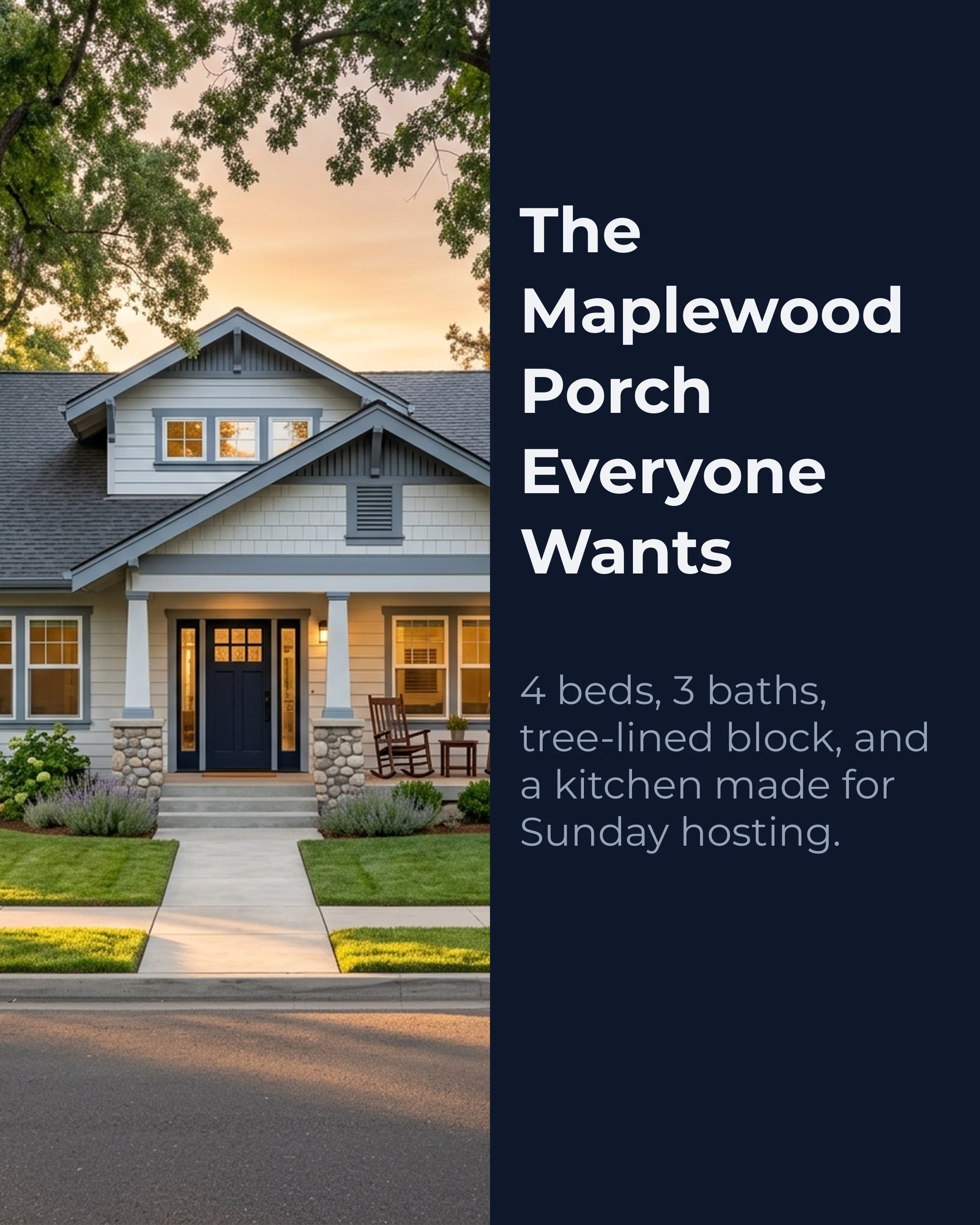
- Slide 1 (Hook): Hero exterior shot with a compelling headline. Not “123 Oak Street” but “This 4-bed Craftsman in Maplewood won’t last the weekend.”
- Slide 2: The feature that sells — the kitchen, the view, the yard. Lead with the strongest room.
- Slides 3-6: Walk through key rooms with one highlight per slide: “Chef’s kitchen with quartz countertops and gas range” is better than just “Kitchen.”
- Slide 7: Neighborhood context — walkability, nearby amenities, school district
- Slide 8: Key stats — price, beds/baths, square footage, lot size
- Slide 9 (CTA): “DM me for a private showing” or “Link in bio for the full listing”
Example slide content:
Slide 1 (Hook): “This Maplewood Craftsman Has The Porch Everyone Wants”
Slide 2: “Sun-filled kitchen with quartz counters, custom oak shelving, and a six-burner range.”
Slide 3: “Primary suite opens to a private balcony overlooking mature trees.”
Pro tip: Add one unexpected detail per listing. “The previous owner built a hidden reading nook under the stairs” is the kind of detail that makes someone stop scrolling.
2. The Market Update (AIDA Framework)
Format: 5-7 slides with data visualization Best for: Establishing authority and attracting both buyers and sellers
Market update carousels are underutilized in real estate because agents think they’re boring. They’re not — they’re the highest-authority content format available. Buyers and sellers are hungry for local market data, and the agent who provides it consistently becomes their go-to resource.
- Slide 1 (Attention): “Your Neighborhood Just Hit a Record. Here’s What It Means.”
- Slide 2 (Interest): Median price trend with a clear directional arrow
- Slide 3: Days on market comparison (this month vs last year)
- Slide 4: Inventory levels — are you in a buyer’s or seller’s market?
- Slide 5 (Desire): What this means for the reader: “If you’ve been considering selling, your equity has likely increased by $X since last year.”
- Slide 6 (Action): “Want a free valuation of your home? DM me your address.”
3. The Neighborhood Guide (Listicle Framework)
Format: 6-8 slides highlighting a specific neighborhood Best for: Attracting out-of-area buyers and positioning yourself as the local expert
Every agent says they “know the market.” A neighborhood guide carousel proves it.
- Slide 1: “Moving to [Neighborhood]? Here’s What Nobody Tells You”
- Slide 2: Best coffee shops and restaurants (3-4 specific spots)
- Slide 3: Schools and family life (ratings, programs, community events)
- Slide 4: Commute data (average times to major employment centers)
- Slide 5: Housing styles and price ranges (what does $X get you here?)
- Slide 6: Hidden gems — the park, the farmer’s market, the shortcut to the highway
- Slide 7 (CTA): “Thinking about [Neighborhood]? I’ve helped X families find their home here.”
Example slide content:
Slide 1 (Hook): “Moving to Oak Terrace? Start Here Before You Book a Tour”
Slide 2: “Walk to three coffee shops, the Saturday farmer’s market, and the river trail in under 10 minutes.”
Slide 3: “Most homes here are 1920s bungalows and updated brick colonials between $620K and $880K.”

These carousels have long shelf life. Someone moving to the area three months from now will find and save your guide.
4. The “Myth vs Fact” Buyer Education (Myth vs Fact Framework)
Format: 5-6 slides, one myth per slide Best for: First-time buyer audiences, building trust, comment engagement
Real estate is full of misconceptions that create anxiety for buyers. Addressing them positions you as an educator, not a salesperson.
- Slide 1: “5 Home Buying Myths That Cost First-Time Buyers Thousands”
- Slide 2: Myth: “You need 20% down to buy a house” / Fact: “FHA loans start at 3.5% down. Some programs offer 0% for qualified buyers.”
- Slide 3: Myth: “You should wait for prices to drop” / Fact: “Historically, real estate appreciates 3-5% annually. Waiting often costs more than buying.”
- Slide 4: Myth: “The listing price is what you’ll pay” / Fact: “In a balanced market, most homes sell within 2-3% of asking. Your agent’s negotiation strategy matters.”
- Slide 5: Myth: “Pre-approval and pre-qualification are the same thing” / Fact: “Pre-approval involves a full credit check and income verification. Pre-qualification is an estimate.”
- Slide 6 (CTA): “Ready to separate fact from fiction? Let’s talk about your buying timeline.”
5. The “Before and After” Renovation (BAB Framework)
Format: 5-7 slides showing transformation Best for: Flippers, investor clients, staging showcases, renovation-focused agents
Before-After-Bridge carousels work naturally for renovation content:
- Slide 1 (Before): “This 1970s kitchen was dark, cramped, and dated.”
- Slide 2: Additional before context — what wasn’t working and why
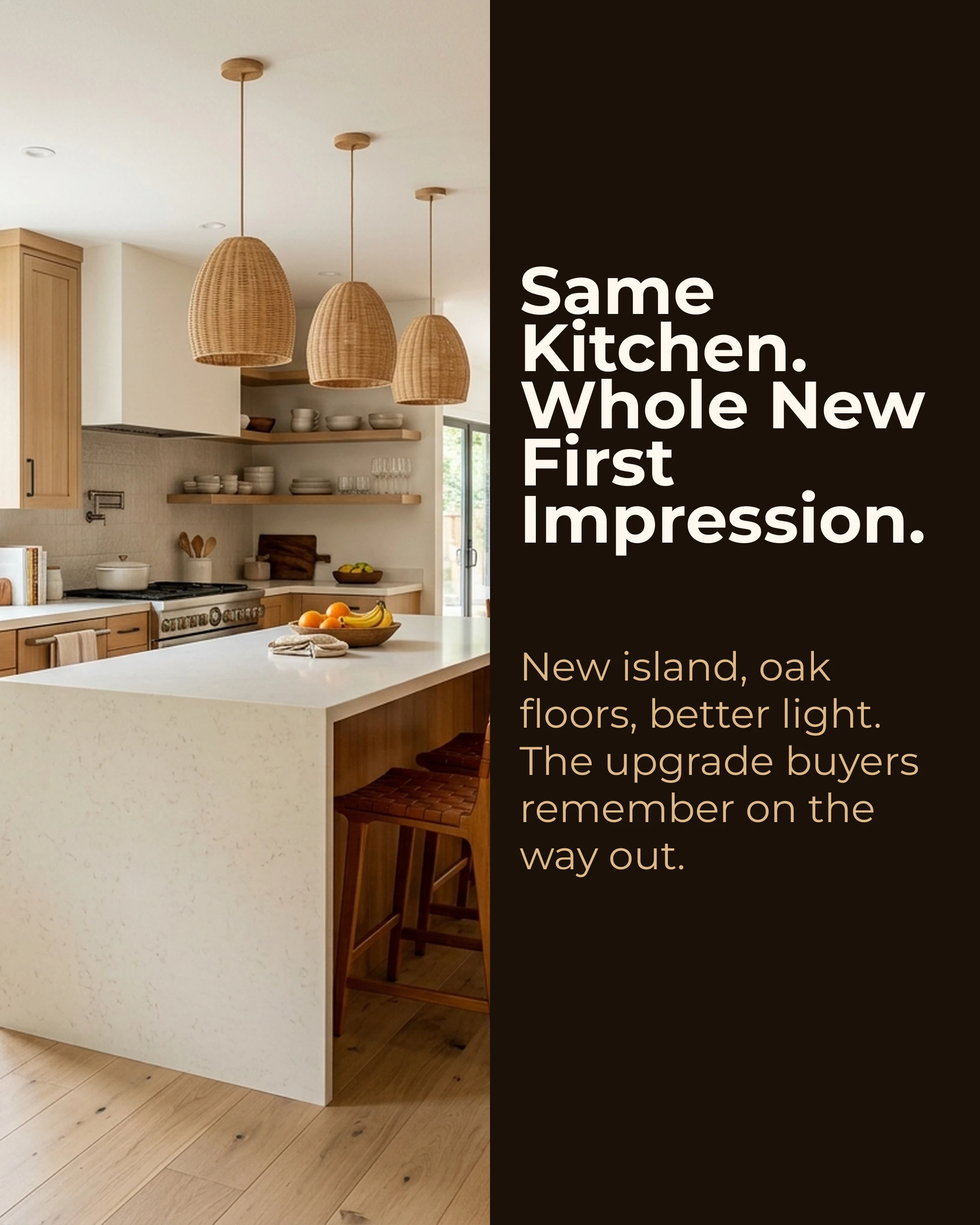
- Slide 3 (After): “Open concept, quartz counters, pendant lighting. Same footprint, completely different feel.”
- Slide 4: After details — specific materials, costs, timeline
- Slide 5 (Bridge): “Thinking about renovating before listing? Strategic updates can increase your sale price by 5-15%. Not every renovation is worth it — let’s talk about which ones give the best ROI in your market.”
Example slide content:
Slide 1 (Before): “This galley kitchen felt dark, dated, and too tight for family life.”
Slide 2 (After): “White oak floors, brighter sightlines, and a waterfall island changed the whole first impression.”
Slide 3 (Bridge): “The sellers spent $28K and accepted an offer $74K above their original target.”
6. The Open House Teaser (PAS Framework)
Format: 5-6 slides building anticipation Best for: Driving attendance to open houses
- Slide 1 (Problem): “Scrolling listings online but nothing feels right?”
- Slide 2 (Agitate): “Photos don’t show you how the light hits the living room at 4 PM. Or how quiet the street is. Or whether the yard is big enough for your kids.”
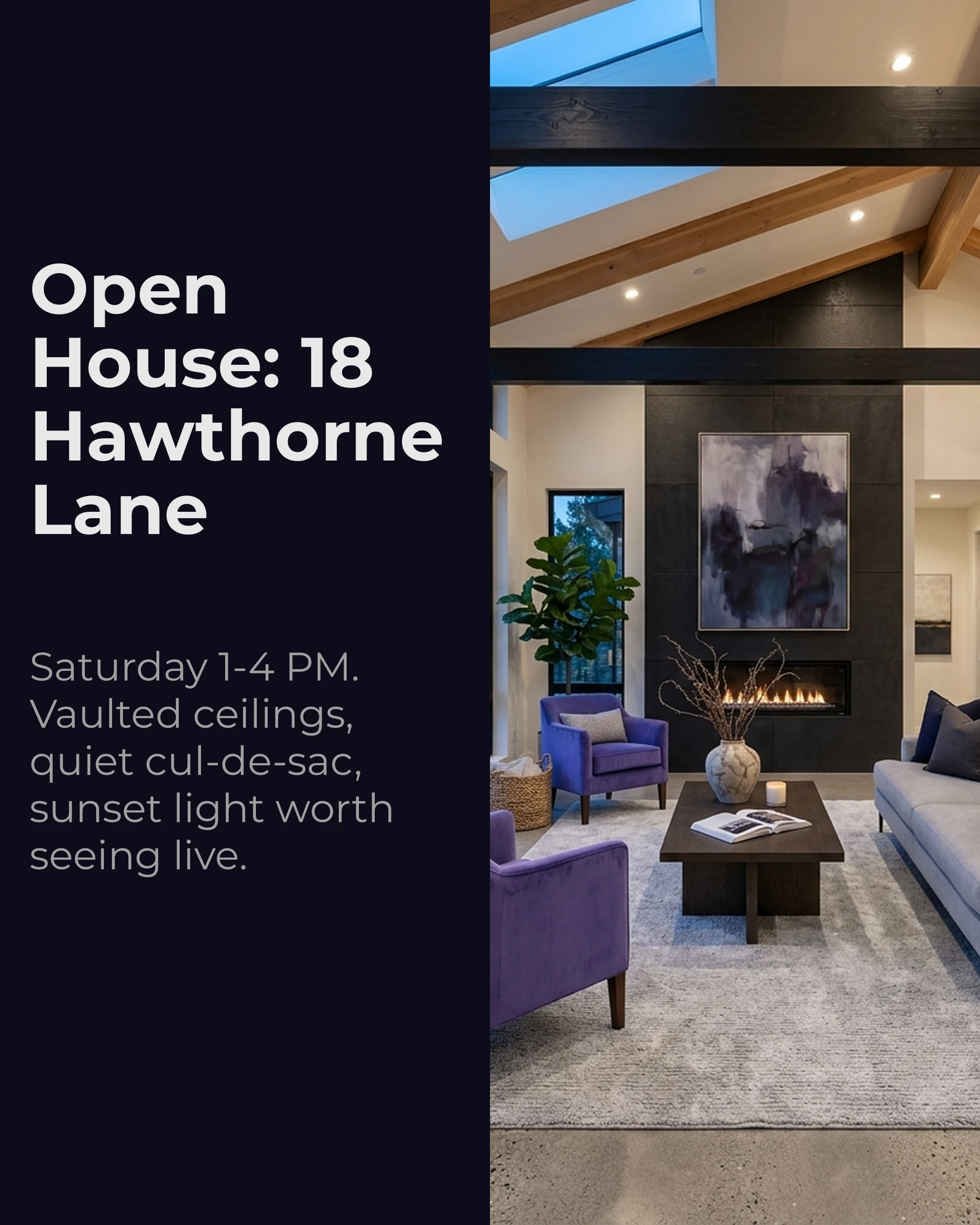
- Slide 3-4 (Solution): “Come see it yourself. Open house this Saturday, 1-4 PM.” Show 2-3 best features.
- Slide 5: Address, date, time, and what to expect
- Slide 6 (CTA): “Save this post and I’ll see you Saturday. DM me for a private preview.”
Example slide content:
Slide 1 (Problem): “The photos looked good, but you still couldn’t tell if it felt like home.”
Slide 2 (Agitate): “You can’t feel the natural light, hear how quiet the street is, or test the flow from kitchen to patio from a listing gallery.”
Slide 3 (Solution): “Tour 18 Hawthorne Lane this Saturday from 1-4 PM and see the vaulted living room in person.”
Palette and Style Recommendations
Real estate carousels should feel professional and trustworthy while standing out in a feed full of amateur property photos.
- Property walkthroughs: Slate palette (sophisticated grays and clean whites) with Montserrat for modern, professional text
- Market updates: Midnight palette (deep navy with crisp contrast) with Space Grotesk for data-forward, authoritative slides
- Neighborhood guides: Warm palette (inviting, earthy tones) with Raleway for friendly, approachable text
- Luxury listings: Lavender palette (refined, subtle) with Playfair Display for elegant serif headlines
Avoid overly bright or playful palettes for real estate — your audience is making six-figure decisions. The visual language should match that seriousness.
Turning Carousel Engagement Into Clients
The goal isn’t just engagement — it’s relationships. Every save, comment, and DM from a carousel is a potential client conversation. Build systems around this:
- Respond to every comment within 2 hours
- When someone saves a property carousel, follow up with a DM (if they’re a follower)
- Track which carousel types generate the most DMs and double down
Tools like Carousel make it fast to produce professional-looking carousel posts with frameworks like AIDA and PAS built in. Select a framework, add your property details or market data, choose a palette like Slate or Midnight, and export a polished slide deck in minutes.
Key Takeaways
- Real estate carousels should tell a story, not just display photos
- Property walkthroughs structured as narratives outperform unstructured photo dumps
- Market update carousels are the highest-authority format — and most agents neglect them
- Neighborhood guides have long shelf life and attract out-of-area buyers
- Use professional, muted palettes (Slate, Midnight, Warm) that match the seriousness of the purchase
- Track saves and DMs as your primary conversion metrics, not likes
Ready to create real estate carousels that generate showings? Download Carousel — free on the App Store.